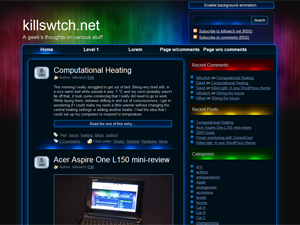
My first WordPress theme, KillerLight, has been released on wordpress.org. The theme is a slightly altered version of the one used on here.
Like this site, it has a javascript-based animated header which fades slowly for a lovely faux-lighting effect. All current WordPress features are supported, including widgets and gravatars.
One important thing to note about the theme is that IE 6 is not supported – it’s just not worth the effort. Instead, a message is displayed to users of IE < 7 informing them that they should either upgrade or get a different browser.
Very nice theme. The animation appears not to work for me and my co-author. We receive the “disabled” warning. I am running latest version of MAC Firefox and she is running IE7 (completely different locations, sytems, etc.)
Have not delved into anything. Did bring the FF error console up and it is clear.
Nice theme even without the animation!
Thanks 🙂
The disabled warning normally only comes up when the computer you’re viewing the site on is having problems keeping up. Unfortunately the animation is quite intensive on the computer’s processor, so on slow machines it may be disabled immediately. On fast computers it still might get disabled if you scroll up and down a lot, for example.
The threshold at which it triggers can be tweaked though, and in future versions I might alter it to be a bit more leanient and possibly give the option of never automatically disabling itself.
I’m going to continue looking for alternative ways of doing the fading animation. I’ve already tried flash (with some problems), and animated PNG (which has very little support and huge file sizes at ~27MB).
I love the look of this theme. I’m wondering though, is there a way to disable animation on the theme so that visitors to my site don’t have the option to enable it?
At the moment, no. However, I will look at including an option to do so in the next version, configurable through the WordPress admin interface.
Thanks for the quick response…again, favorite theme I’ve seen in awhile!
I too am having problems with the animation banner.
If the threshold is altered to give a bit more leniency it may help.
Either way, this is a wonderful theme.
Thanks so much for sharing it.
~Michael
I notice you’re also having problems with the background colour and border I chose to put on images. The background colour and border will probably be removed in the next release, because it screws up transparent images including your signature and the WP smileys.
P.S. I’m hoping to move into my new place in a couple of weeks, so the next version will probably be at least 3-4 weeks away. I won’t have easy access to the net for a week or two either 🙁 so responses might be a bit slow.
Nice theme dude. Is there any way to make the menu as drop down menu?
Advise me, i want to use this on my website.
Thanks in advance.
I won’t be adding drop-down menus as in my opinion (and most professional web devs) they are nasty things. However, the next version will hopefuly have support for a sub-navigation on the right-hand side for pages which have sub-pages.
How much pc power is required to run the animation?
I’m using a quadcore with 8gb of RAM and 512mb graphics on Linux64 and Firefox 3 and it doesnt run..
Great looking theme though 🙂
Ahh nevermind, its a linux64/java issue…
Can we still get the non-animated version? 🙂
Hi there, after I install ur theme,i cant see meta and there is no way for me to log in my acc anymore. could u pls fix the bugs asap
Thank u very much~ ^^
You may need to edit your side bar to include the ‘meta’ section, but since you can’t get to the login link any more I guess that might be a problem. Try typing in the URL of your blog and add ‘/wp-admin/’ to the end e.g. for my blog it is ‘http://www.killswtch.net/wp-admin/’.
If the meta section is there already, what version of WordPress are you using? The theme has only been tested with 2.7.x
Beautiful theme, considering porting it to BlogEngine. Would you mind? Of course, credits would be maintained. 🙂
Love it!
Once a stable version is ready for WP, I think I could try porting it to BlogEngine. Suits my skill set a little better, since I’m primarily a .Net developer.
I actually disabled the animation just by taking the call to it out of the … header page? I don’t remember where it was, but I just deleted the reference and it works beautifully.
Please, please, please tell me you plan to adapt it to take advantage of the new threaded comments option of WP 2.7. I’m really new to WP and just spent the better part of a day trying to figure it out. I can fake it just by replacing the extant Comments.php with the default WP theme’s comments.php and get the threading, but it’s not nearly as pretty as with your green and blue boxes.
I tried using the threaded message plugins but couldn’t get the background of the reply box to default to black, (another several hours wasted) so the white default test didn’t show up at all. Very frustrating.
Anyway, quite an amazing theme. Many compliments on it already.
Whoops! White default text, not test. :blush:
I’ve added threaded comments to the growing list of things to do for the next version.
YAYAYAYAY Thanks.
I’ll keep my eyes open for it. Meantime, and just FYI, for those not obsessed with beauty, which this page has in abundance, the generic threaded comments “comment.php” from the WordPress Default Theme does at least give an innocuous comment/reply association.
I create my website with killswitch
http://www.cityofdownloads.org
Hi.
I saw the posts and now after I saw this website that is not a issue in the computer process that make this theme not running, I´m using a WordPress mu last version (based in 2.7.1) and here in your website I can see the effect runnign, in mine, not.
I hope in the next rev. of this theme see it working.
Thks.
I love this theme and use it on my site, I removed the call for background anim from header.php (read in previous post)I hope you don’t mind.
I shall be watching for future updates but in the meantime “Thanks4that”
Great work Simon
I needed drop down menu for my site, because of so many navigation links. Because of this i may not be using this theme. Otherwise it is a nice theme.
Love this theme 🙂 I am using it on my site, the colors are awesome! And easy on the eyes 😀
Thank you so much for sharing your talents. I’m just beginning to use WP and build my new site and I love this theme even without the animation. Can’t wait to see more of your work!
Thanks for the beautifull theme ! ^^!
Visit my site if you’re interested !
Very nice theme.. i like it.
Salu2.
Hi, just wanted to hello and to say that I have been using this theme for wordpress for awhile now and love it!! You did a great job and I thank you for your effort. I do have a question that maybe you can answer for me. On the home page the link that says HOME, is there a way where I can edit the destination to where it takes you when you click on it? The reason I ask is that if a user clicks on my banner that wordpress put up it takes them to the correct webpage which really just reloads the main page again, however when you click on the HOME link at the top of the website it take you to the main domain and not the page that you are currently on, it should just reload the main page of the website.
Examle:
Clicking on the banner from wordpress
http://www.anysite.com/mysite/
clicking on the home link at the top of the page
http://www.anysite.com
I would like the HOME link to load just like the WP if possible but if not how do I delete the HOME link?
Any info would be appreciated.
Thanks
bobbcat
How you change the favicon???
I like the theme, except for the favicon.
To change the favicon, replace the favicon2.ico file in the ‘images’ directory within the killerlight theme folder with your own. Your favicon must be in the correct format – you can use a tool such as http://www.favicon.co.uk/ to produce a file in the correct format from your own image.
by any chance are you going to add a drop down down menu?
Or can you just give me the changes for it
Yes, but it may not be soon. I don’t have the time at the moment to work on the next version of the theme, unfortunately.
WOW! Really love this theme!!~
NICE AND GREAT JOB!
Hello there, just stoped by to say thanks for this very lovely design. The animation doen not work on my vista, which is upgraded and handles anything.
Anyways I love this team even without animation :).
I am not here to complain though, so thank you dear.
Hi Simon.
Since I installed your theme just after you released it, I’ve been very pleased with it. It’s neat!
I’ve just upgraded my PC to a 4x core virtualising monster and have finally been able to see the animation. It’s cool, a bit like the lighting I planned for the studio, bizarrely.
As for menus that others have mentioned. I hate drop-downs and most pros do. I’ve found a plugin, http://www.ibsteam.net/blog/web-development/simple-sidebar-navigation-plugin-wordpress, to be really useful. The guy (Max), made some serious code changes about the time your theme came out and in-line with the WP release at that time which immensely improved it.
I’ve found your theme, coupled to his menu system, very stable and reliable, and the two suit me just fine!
Thanks again.
Rees
Hi Rees,
Thanks for the great and helpful feedback. You’ve made an impressive combination of the theme and plugins. I think I’ll try and make the animation a little less intensive in the next version though – don’t think everyone has a 4 core beast of a machine 🙂
Simon
Nah! We want more, not less…! Just think, with Moore’s law everyone will be able to see it soon.
The theme is so perfect that I actually did not mind translating it in every php file since you did not do the localization in a separate file. Maybe it will be included in some future version? Thank you!
I love the look of this theme, it is exciting. I’m sure it is a simple tweek, but how could I decrease the size of the sidebar? Will this increase the size of the blog post column?
Thanks,
and I can’t wait to see what you have planned next.
Oh, yeah, when I was diagnosed with Cancer I went skydiving too. Checked that one off my bucket list! What a thrill, I recommend it to everyone to experience!
The look of this theme is the best, I see.
Please, how is possible to show a subnavigation in the topnavigation, like a mouseover?
Sorry for my bad english
Hi,
Great theme 🙂
Couple of questions.
Where can I delete the “Subscribe to commnets RSS” at the top?
And how can I add things to the bottom section like you have? (Archives, Blogroll, Site’s I’ve Worked on.)
Cheers
My PC is not a slow one… I have 4 Gb Memory – 1GB video DDR RAM – 3+Ghz Intell Processor… Can you publish your requirements to use your background animation?
I get the message on all browsers IE8, Chrome, Mozilla, Safari…
What is the animation suppose to do?
I would suggest a non background animation version… You basic color schemes and Neon Lights look is attractive… Maybe background animation is overkill
We are currently thinking of using this theme, we like the format and colors etc. We have just one issue, or question how could we replace the Text header with our own banner?
Thanks for a great theme.
To do this, you need to comment out the heading inside the theme files, and edit the 3 background header images to include your branding. Unfortunately I can’t be any more precise than that at the moment.
Thanks killswitch for such a speedy response. I will take a look at it and see if I can hack it up without breaking anything.
Peace